Summary:
In this week’s topic, we’ll cover what to do if you mistakenly unsubscribe from emails within AutomationWorx, along with tips for resolving the issue.
Details of what’s in the video:
Here is a summary of the key points:
Issue Overview:
Problem: A user (Lou) accidentally unsubscribed from their own test emails, preventing them from receiving the messages.
Steps to Resolve:
Check Contact Record:
The first step is to locate the contact in the AutomationWorx system (in this case, Lou’s Gmail address) to verify the email status.
Opt-in Status:
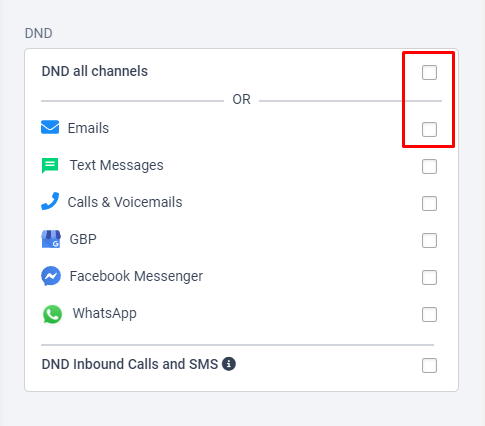
If the contact record has a "Do Not Disturb" or "Unsubscribed" flag checked, it means the person has opted out of receiving emails. Uncheck this flag to opt them back in.
Check Spam Folder:
If the contact’s email is not marked as unsubscribed, the next step is to verify whether the emails are landing in the spam or junk folder.
Log a Support Ticket:
If the issue persists, users are advised to log a support ticket within the platform for further investigation, allowing the team to look deeper into transactional levels and email delivery.
Additional Tips:
The issue of self-unsubscription happens occasionally, and checking the “Do Not Disturb” status in the contact record typically resolves the problem.
Conclusion:
After resolving the unsubscribed issue, users are encouraged to submit a support ticket if emails are still not received, and to ensure their opt-in settings are correct within the system.
Was this article helpful?
That’s Great!
Thank you for your feedback
Sorry! We couldn't be helpful
Thank you for your feedback
Feedback sent
We appreciate your effort and will try to fix the article